- <GetStart>
- CSPro User's Guide
- The CSPro System
- What is CSPro?
- CSPro Capabilities
- Release History
- What's New in CSPro?
- CSPro Applications
- CSPro General Concepts
- CSPro General Functionality
- How To ...
- Create a CSPro Application
- Open an Existing Application
- Change the View
- Designer Font Preferences
- Change Windows
- Change the Print Page Setup
- Print All or Part of a Document
- Save an Application
- Close an Application
- Save an Application with a New Name
- Specify Application File Names
- Manage Application Files
- Pack an Application
- Manage Credentials
- Get Help
- Collaborating on CSPro Development
- Data Dictionary Module
- The CSPro Language
- Data Entry Module
- Batch Editing Applications
- Tabulation Applications
- Data Sources
- Synchronization
- CSPro Statements and Functions
- Text Templates
- Templated Reporting System
- HTML, Markdown, and JavaScript Integration
- Action Invoker
- Appendix
- The CSPro System
- <CSEntry>
- <CSBatch>
- <CSTab>
- <DataManager>
- <TextView>
- <TblView>
- <CSFreq>
- <CSDeploy>
- <CSPack>
- <CSDiff>
- <CSConcat>
- <Excel2CSPro>
- <CSExport>
- <CSIndex>
- <CSReFmt>
- <CSSort>
- <ParadataConcat>
- <ParadataViewer>
- <CSCode>
- <CSDocument>
- <CSView>
- <CSWeb>
Designer Font Preferences
ANSI Font Handling
Versions of CSPro prior to 5.0 supported some languages that used non-Latin alphabets such as Armenian and Russian. With the switch to Unicode support in CSPro 5.0, this feature has been removed. Old applications that used these language specific ANSI fonts will no longer look correct in the CSPro Designer. For example, this is a value set in an Armenian dictionary:

To view these old applications correctly, you can manually change the font used to render the text in the dictionary grid, the dictionary and form tree, and, if the font is monospaced, the application's logic.
With no application open within the CSPro Designer, select Tools -> Preferences -> Fonts.

In this example, an Arial Armenian font has been selected, at an increased zoom rate. After this selection, the dictionary editor displays the contents better:
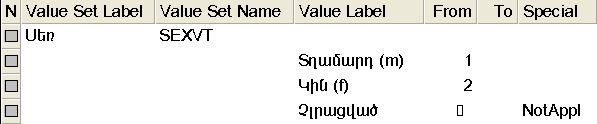
Ultimately you will want to convert your application to Unicode, as these font preferences are disregarded by CSEntry. Many tools exist to convert ANSI language scripts to their Unicode equivalents.
Font Display Within CSPro Designer
Some users may find that the CSPro Designer renders the Unicode characters for their language at a very small size. By choosing a zoom factor while leaving the font name blank, it will increase the characters to the magnification level chosen.