- <GetStart>
- CSPro User's Guide
- The CSPro System
- Data Dictionary Module
- The CSPro Language
- Data Entry Module
- Batch Editing Applications
- Tabulation Applications
- Data Sources
- Synchronization
- CSPro Statements and Functions
- Text Templates
- Templated Reporting System
- HTML, Markdown, and JavaScript Integration
- Action Invoker
- Appendix
- <CSEntry>
- <CSBatch>
- <CSTab>
- <DataManager>
- <TextView>
- <TblView>
- <CSFreq>
- <CSDeploy>
- <CSPack>
- <CSDiff>
- <CSConcat>
- <Excel2CSPro>
- <CSExport>
- <CSIndex>
- <CSReFmt>
- <CSSort>
- <ParadataConcat>
- <ParadataViewer>
- <CSCode>
- <CSDocument>
- <CSView>
- <CSWeb>
Data Entry Elements
• Forms
A form is a collection of fields, text and/or rosters which appears on the screen at the same time during data entry. A form may be larger than the actual screen. When this is the case, the form will scroll as necessary during data entry so that the current point of entry is always visible to the keyer. A form may repeat if it contains fields from a dictionary record which has more than one occurrence.
• Rosters
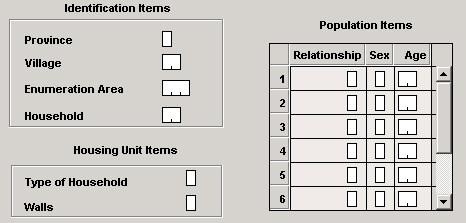
A roster is a grid that shows multiple occurrences of a group at the same time. Many questionnaires have rosters printed on them. A typical example would show each person as a row and each column as a variable, as shown below. Rosters can also have a vertical orientation, in which case the rows and columns would be reversed.
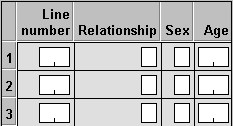
In CSPro, you can show repeating groups as a roster on a single form or as individual fields on a form that repeats.
The darker gray area at the top of each column is called a column heading. In the example above, the column headings contain the text "Line number", "Relationship", "Sex", and "Age". The text in the darker gray area to the left of each row is called the "occurrence label." In the example above, the occurrence labels are "1", "2", "3". These are the default values.
In rosters with vertical orientation, column headings and occurrence labels are reversed.
• Fields
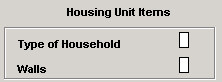
Fields are areas of a data entry form that may be keyed or may show values. Fields may be placed directly on the form or may be part of a roster on the form. Fields are always associated with dictionary items. Some properties of fields, such as length and type (numeric or alphanumeric), are defined in the data dictionary. Other properties are defined in the forms designer. In this example we have two fields:
See also: Add a Form, Add a Roster to a Form, Add Fields to a Form