- <GetStart>
- CSPro User's Guide
- The CSPro System
- Data Dictionary Module
- The CSPro Language
- Data Entry Module
- Batch Editing Applications
- Tabulation Applications
- Data Sources
- Synchronization
- CSPro Statements and Functions
- Text Templates
- Templated Reporting System
- HTML, Markdown, and JavaScript Integration
- Action Invoker
- Appendix
- <CSEntry>
- <CSBatch>
- <CSTab>
- <DataManager>
- <TextView>
- <TblView>
- <CSFreq>
- <CSDeploy>
- <CSPack>
- <CSDiff>
- <CSConcat>
- <Excel2CSPro>
- <CSExport>
- <CSIndex>
- <CSReFmt>
- <CSSort>
- <ParadataConcat>
- <ParadataViewer>
- <CSCode>
- <CSDocument>
- <CSView>
- <CSWeb>
Data Dictionary Tree
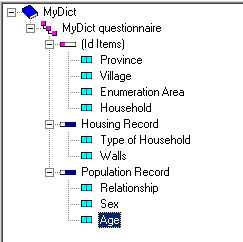
The Data Dictionary Tree is composed of the following elements:

This is the highest tree node, and identifies the data dictionary file.

This is the second-tier tree node, which usually corresponds to a questionnaire or case. For each level there must be at least 1 ID Item and 1 record. While CSPro supports up to 3 levels, the majority of data entry applications can be designed using just 1 level.

Id items can be considered on equal footing with the Level. For each level defined within the dictionary, at least one identification item must be given.

Records can be considered on equal footing with the Level. For each level defined within the dictionary, at least one record must be given. Within each record, at least one field must be given.

Regular (non-ID) items are found within a record, and correspond to questions on a questionnaire. If the item contains subitems (think of dates that are broken into their constituent parts of year, month, and day), these will be designated with the  icon.
icon.
icon.
A value set has the lowest hierarchy on the dictionary tree. It will only appear when an item (or subitem) has more than one value set. In this situation, a "+" symbol will appear next to the field indicating that the field can be expanded.