The Statistical Services Centre at the University of Reading will conduct a six-day workshop from October 24 – 31, 2012. The workshop is entitled "Data Management Using CSPro: A Hands-On Approach." The workshop focuses on data entry and management of data, including using CSPro data with other statistical software packages. For more information, visit the SSC training page.
Calculating Population Densities
(This example makes use of area name processing. Make sure that you understand area processing before you proceed with the example.)
Censuses often contain tables of population densities, e.g., population per square kilometer. While the census data file contains population totals, it generally does not contain information about the area (e.g., square kilometers, square miles, hectares, etc.) of a geographic level. This data is usually maintained in a separate file. This example illustrates how you can bring square area data into your application so that you can calculate population densities. Our standard for square area will be square kilometers. If you are using square miles, hectares, acres, etc., substitute accordingly. In the example below I am using the Popstan example in CSPro's example folder. Download the example.
1. Add a record to your census data dictionary to contain the square kilometer information. You will need to give this record a unique record type identifier. In this example I use "8" for the record type identifier for the square kilometers record.

2. Change all required records to "not required." (Make sure that your data has been properly edited!)
3. Obtain a file of square kilometers for the geographic levels. In this example, this data is contained in an Excel spreadsheet. You will need the lowest level of geography for which you are calculating population densities. In the attached example, I use Province and District, with District being my lowest level of geography.
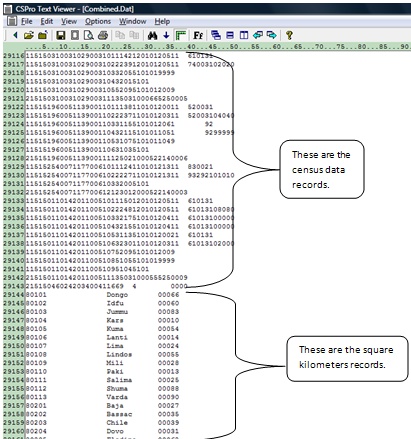
4. Export the square kilometer data into a fixed form text file (*.prn). The format of this file must match the format specified in the record type created in step 1. Space fill or zero fill ID fields that are not used for the levels of geography of the population densities. You can use Text Viewer to view the square kilometers file (PopStan_Sq_Km.prn). Below shows a portion of the square kilometers data used in this example.
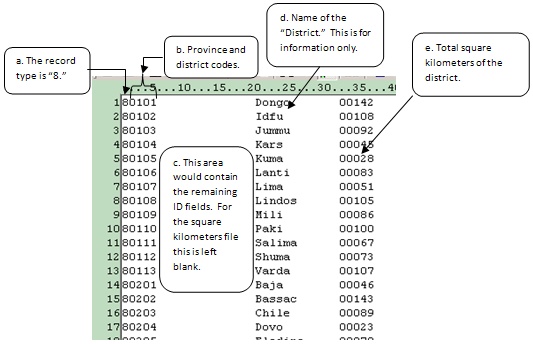
a. The first column contains "8." This is the record type of the square kilometers record.
b. Columns 2 and 3 contain the province code; 4 and 5 the district code. These are the geographic levels for which we will calculate population densities.
c. Columns 6 to 19 are the remaining ID files. These are space filled.
d. Columns 20 to 31 contain the name of the district. This is for information purposes only and is not used in the application. Note that we only have square kilometer data at the district level. This is because CSPro will calculate the province level data by summing the districts, and the Popstan total by summing the provinces.
e. Columns 32 to 36 contain the square kilometers for the district.
5. Now prepare your tables. In this example, the first table shows the distribution of square kilometers and the total square kilometers of a given geographic area. The second table shows the population for a given geographic area, the total square kilometers for that area, and the population density. Both tables use the same methods. We will focus on Table 2 because that table contains the population density.
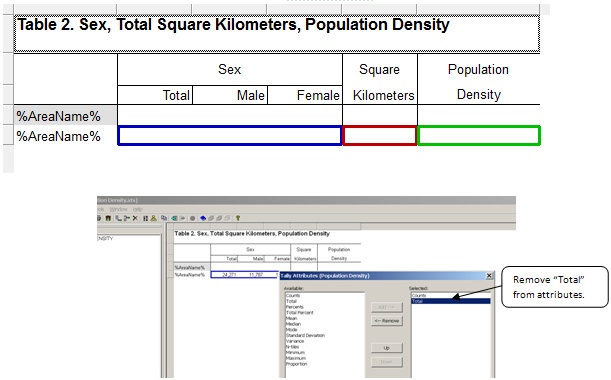
You will need a column for square kilometers in your table. This will actually be a subtable in your table. Do this by dragging the square kilometers value set to the table. Since you only need one column, remove unneeded attributes for the square kilometers column by right-clicking on the column header, clicking on Tally Attributes for the variable, and removing "Total" from the selected attributes.

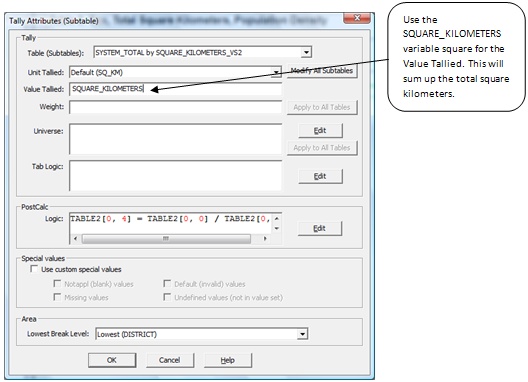
Since you are tallying the total square kilometers, you need to tally the value. Enter the variable name (SQUARE_KILOMETERS) for the "Value Tallied."

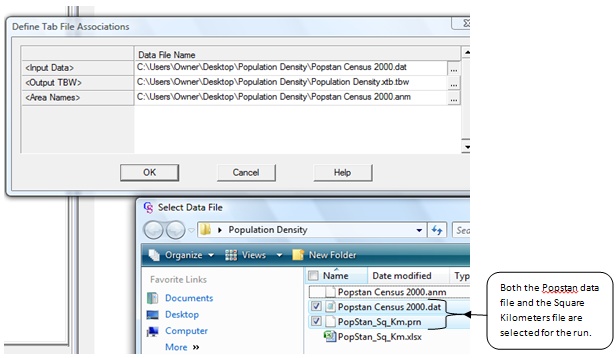
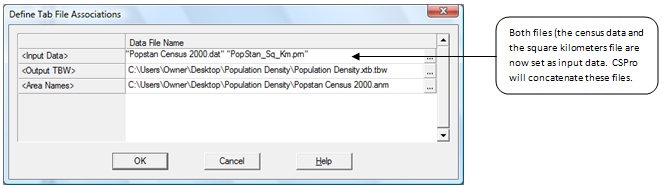
6. Run your tables. When you run the tables you will need to select both the data file and the square kilometers file.


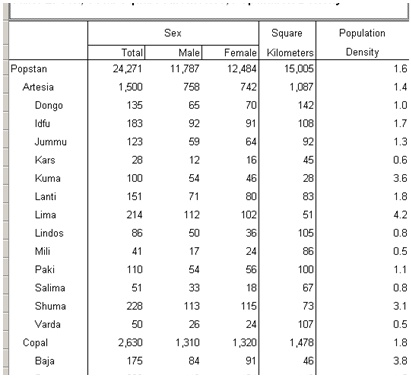
The following is a portion of the resulting table:

How does this work?
The basic concept is that we are adding new cases that contain only ID and square kilometer information for the geographic level. When CSPro processes the record it tallies them to the appropriate level of geography. There is one and only one record for that level of geography.
After CSPro tallies the table, in consolidates them; i.e., it puts together the level of geography to sum up to higher levels and then sorts the tallied tables.

Try running against only the square kilometers file. Note that Table 1 looks the same but Table 2 contains no population data because that file was not included. Now run against only the census data file. Notice now that Table 1 has no data. This is because the square kilometers file was not included. Table 2 contains only population data put no square kilometers data. Put the Census Population Data file and the Square Kilometers file together in a single run and you have all you need to calculate population densities.

Splitting a Data File Using Batch Logic
Using only CSPro there is no simple way to split a data file into several parts. Someone asked me: "How would I split a file with 300 cases into six files, each with 50 cases?" It is possible to do this by writing a recursive batch program. This is not a particularly efficient way to split a file into parts, but it works fine for data files that are not so large. This code is probably not worth using if your data file contains more than a million cases.
What I do here is use the skip case statement to selectively write out cases. The first run of the program, I do nothing but create a PFF that calls the program again with the starting position. Then that program runs, writing out certain cases and skipping others, and then calls the program again, with a new starting position. This continues until the whole file has been processed. In the above example, the program would be run seven times, once to initialize the PFF, and then six times for each block of 50 cases. See the code below:
numeric numCasesPerFile = 50;
numeric currentCase,currentIteration,desiredStartCase,desiredEndCase;
file pffFile;
function writeOutPffAndStop(nextStartIteration)
setfile(pffFile,maketext("%s%d%d_%d.pff",pathname(temp),sysdate("YYYYMMDD"),systime(),nextStartIteration));
filewrite(pffFile,"[Run Information]");
filewrite(pffFile,"Version=CSPro 4.1");
filewrite(pffFile,"AppType=Batch");
filewrite(pffFile,"[Files]");
filewrite(pffFile,"Application=%ssplitFile.bch",pathname(application));
filewrite(pffFile,"InputData=%s",filename(CEN2000));
filewrite(pffFile,"OutputData=%s_%d",filename(CEN2000),nextStartIteration);
filewrite(pffFile,"Listing=%s.lst",filename(pffFile));
filewrite(pffFile,"[Parameters]");
filewrite(pffFile,"ViewListing=Never");
filewrite(pffFile,"ViewResults=Yes");
filewrite(pffFile,"Parameter=%d",nextStartIteration);
close(pffFile);
execpff(filename(pffFile));
stop();
end;
PROC DICTIONARY_FF
preproc
if sysparm() = "" then // we're on the first run
writeOutPffAndStop(1);
else
currentIteration = tonumber(sysparm());
desiredStartCase = 1 + ( currentIteration – 1 ) * numCasesPerFile;
desiredEndCase = desiredStartCase + numCasesPerFile – 1;
endif;
PROC QUEST
preproc
inc(currentCase);
if currentCase > desiredEndCase then
writeOutPffAndStop(currentIteration + 1);
elseif currentCase < desiredStartCase then
skip case;
endif;
You can use this code almost exactly as is, with the following modifications:
- Modify the numeric numCasesPerFile from 50 to your liking.
- Replace "CEN2000" with the name of your dictionary. (There are two places where this appears.)
- Replace "DICTIONARY_FF" with the name of your top-level batch PROC. (It will end with _FF.)
- Replace "QUEST" with the name of your dictionary's first level.
See here for an example of this application using the Popstan dictionary.
Tools for Edit Processing
Recently I put up two new tools that may be useful to people using CSPro to edit data.
The first tool, Listing File Comparer, provides a way of quickly looking at the error percentages across a group of listing files. This is useful for people who process data, typically census data, on files split by geography.
The second tool, Save Array Viewer, is a program that visually displays the contents of save array files. This program is especially useful if you use DeckArrays for hotdeck imputation.
Also newly posted on the site is a tutorial about creating CAPI applications written by Anne Abelsæth of Statistics Norway: "Development of Data Entry and CAPI Applications in CSPro"
Keeping Track of Entered Cases
Unfortunately, CSPro does not have a way, within a data entry application, to get a listing of the IDs of the other cases that have been entered to the primary data file. If your application is somewhat simple, you can write a two-dictionary application to facilitate a basic version of case management.
In this example, the main dictionary of the application is a junk dictionary. Any data entered to this dictionary will be ignored. We only use this dictionary to provide the framework for the main data entry application and as a way to enter a menu selection.
The external dictionary and form is actually where data is entered for this application. By using loadcase and writecase statements, it is possible to add and modify cases.
Whenever the data entry application is started, an array is populated with information about all of the cases in the data file. In this example, the program is hardcoded to expect that information about households 1-8 will eventually be added to the file. The program reports on what has been entered and what cases are remaining.

This list is created by using the find statement to check on all of the expected IDs in the external file (which really is the main data file for this application). Then the setvalueset and setcapturetype functions display the results on the screen.
Download the example here, or view the code below.
array numeric casesIDs(100);
array alpha (30) casesLabels(100);
numeric numberCasesExpected = 8; // eight cases expected for the cluster
PROC MENU_FF
PROC MENU_ID
onfocus
MENU_ID = notappl; // reset any value that might be here
numeric cnt,numLabels,someCasesNotEntered;
do cnt = 1 while cnt <= numberCasesExpected
HHID = cnt;
casesIDs(numLabels) = HHID;
if find(QUESTIONNAIRE_DICT,=,itemlist(HHID)) then
casesLabels(numLabels) = maketext("Modify Household %d",cnt);
else
casesLabels(numLabels) = maketext("Add Household %d",cnt);
someCasesNotEntered = 1;
endif;
inc(numLabels);
enddo;
casesIDs(numLabels) = 99;
casesLabels(numLabels) = "Quit";
inc(numLabels);
casesIDs(numLabels) = notappl; // end the dynamic value set
setvalueset(MENU_ID,casesIDs,casesLabels);
setcapturetype(MENU_ID,1);
postproc
if MENU_ID = 99 then
if someCasesNotEntered then
if ( errmsg("You are not finished entering cases. Are you sure you want to quit?") select("Yes",continue,"No",continue) ) = 2 then
reenter;
endif;
endif;
stop(1);
endif;
HHID = MENU_ID;
if not loadcase(QUESTIONNAIRE_DICT,HHID) then
clear(QUESTIONNAIRE_DICT); // we are adding a new case so we must make sure the fields are blank
HHID = MENU_ID;
endif;
enter QUESTIONNAIRE_FF;
writecase(QUESTIONNAIRE_DICT); // write the case to the data file
reenter;