Keeping Track of Entered Cases


Unfortunately, CSPro does not have a way, within a data entry application, to get a listing of the IDs of the other cases that have been entered to the primary data file. If your application is somewhat simple, you can write a two-dictionary application to facilitate a basic version of case management.

In this example, the main dictionary of the application is a junk dictionary. Any data entered to this dictionary will be ignored. We only use this dictionary to provide the framework for the main data entry application and as a way to enter a menu selection.

The external dictionary and form is actually where data is entered for this application. By using loadcase and writecase statements, it is possible to add and modify cases.

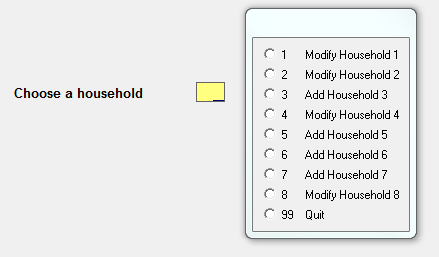
Whenever the data entry application is started, an array is populated with information about all of the cases in the data file. In this example, the program is hardcoded to expect that information about households 1-8 will eventually be added to the file. The program reports on what has been entered and what cases are remaining.

20120222menu

This list is created by using the find statement to check on all of the expected IDs in the external file (which really is the main data file for this application). Then the setvalueset and setcapturetype functions display the results on the screen.

Download the example here, or view the code below.

PROC GLOBAL

array numeric casesIDs(100);
array alpha (30) casesLabels(100);

numeric numberCasesExpected = 8// eight cases expected for the cluster

PROC MENU_FF

PROC MENU_ID

onfocus

    MENU_ID = 
notappl// reset any value that might be here

   
numeric cnt,numLabels,someCasesNotEntered;

   
do cnt = 1 while cnt <= numberCasesExpected

        HHID = cnt;
        casesIDs(numLabels) = HHID;

       
if find(QUESTIONNAIRE_DICT,=,itemlist(HHID)) then
            casesLabels(numLabels) = 
maketext("Modify Household %d",cnt);

       
else
            casesLabels(numLabels) = 
maketext("Add Household %d",cnt);
            someCasesNotEntered = 
1;

       
endif;

       
inc(numLabels);

   
enddo;

    casesIDs(numLabels) = 
99;
    casesLabels(numLabels) = 
"Quit";

   
inc(numLabels);
    casesIDs(numLabels) = 
notappl// end the dynamic value set

   
setvalueset(MENU_ID,casesIDs,casesLabels);
   
setcapturetype(MENU_ID,1);

postproc

   
if MENU_ID = 99 then

       
if someCasesNotEntered then

           
if ( errmsg("You are not finished entering cases. Are you sure you want to quit?"select("Yes",continue,"No",continue) ) = 2 then
               
reenter;
           
endif;

       
endif;

       
stop(1);

   
endif;

    HHID = MENU_ID;

   
if not loadcase(QUESTIONNAIRE_DICT,HHID) then
       
clear(QUESTIONNAIRE_DICT); // we are adding a new case so we must make sure the fields are blank
        HHID = MENU_ID;
   
endif;

   
enter QUESTIONNAIRE_FF;

   
writecase(QUESTIONNAIRE_DICT); // write the case to the data file

   
reenter;

Converting Check Boxes Into Single Variables


Using checkboxes for categorical variables is a common way for censuses and surveys to quickly get data onto a paper form and scanned into a data file. Enumerators do not have to translate responses into numbers, and scanners can more easily recognize checked boxes than handwritten characters. These checkboxes need to be converted into single variables with single responses. But what do you do when there is more than one checked box, either due to enumerators not understanding how to complete the question or due to scanners reading stray marks as checked boxes?

When converting checkbox variables into a single variable, there are two basic methods for correcting multiple checks: hotdeck between two marked boxes or determine an order of likelihood. If three or more boxes are marked, the edits become more complicated and, due to the small probability of such occurrences, one can either write complicated edits or the converted variable can be set to blank and edited later using more detailed content edits.

Before converting multiple checkbox variables into a single variable, one must first check the number of boxes marked. This can be done by counting the number of individual checkbox variables. Then the conversion coding will be done based on the number of checked boxes. If only one box is checked, the new variable can easily be created without any special methods to determine the value.

Assuming that the checkbox variables have a value of 1 if checked and 0 if not checked, one can count the number of marked boxes like so:

numeric numChecks = DWELLING_TYPE_SCAN1 + DWELLING_TYPE_SCAN2 + DWELLING_TYPE_SCAN3;

Using a Hotdeck

Hotdecking is a simple way to estimate the value of a variable based on the checked boxes and on related variables. In the example below, in cases when two boxes are checked, the selection of which of the two values will be used for the new variable is determined from the roofing material. The hotdeck array has two dimensions: the first for each combination of the two checked boxes, and the other for the roofing material. When there are no checked boxes, then the new variable is left blank, to be handled by later edits. When one box is checked, the new variable is coded according to the checked box and the hotdeck is updated based on each combination of two checked boxes and on the roofing material. If two boxes are checked, then the new variable is coded based on the hotdeck using the given combination of checked boxes and the roof type.

Question: Type of Dwelling?
Answers: Separate, Apartment, Joint/Barrack House
Conversion Method: Hotdeck based on roofing material

numeric dwellTypeHD12 = 1,dwellTypeHD13 = 2,dwellTypeHD23 = 3;

numeric roofMaterial;

if ROOF_MATERIAL_SCAN1 then         roofMaterial = 1;
   
elseif ROOF_MATERIAL_SCAN2 then roofMaterial = 2;
   
elseif ROOF_MATERIAL_SCAN3 then roofMaterial = 3;
   
elseif ROOF_MATERIAL_SCAN4 then roofMaterial = 4;
   
else                            roofMaterial = 5;
endif;

if numChecks = 0 then
   
// leave DWELLING_TYPE blank, to be edited later during the content edits

elseif numChecks = 1 then

   
if DWELLING_TYPE_SCAN1 then
        DWELLING_TYPE = 
1;
        dwellTypeHD(dwellTypeHD12,roofMaterial) = 
1;
        dwellTypeHD(dwellTypeHD13,roofMaterial) = 
1;

   
elseif DWELLING_TYPE_SCAN2 then
        DWELLING_TYPE = 
2;
        dwellTypeHD(dwellTypeHD12,roofMaterial) = 
2;
        dwellTypeHD(dwellTypeHD23,roofMaterial) = 
2;

   
elseif DWELLING_TYPE_SCAN3 then
        DWELLING_TYPE = 
3;
        dwellTypeHD(dwellTypeHD13,roofMaterial) = 
3;
        dwellTypeHD(dwellTypeHD23,roofMaterial) = 
3;

   
endif;

elseif numChecks = 2 then

   
if DWELLING_TYPE_SCAN1 and DWELLING_TYPE_SCAN2 then
        DWELLING_TYPE = dwellTypeHD(dwellTypeHD12,roofMaterial);

   
elseif DWELLING_TYPE_SCAN1 and DWELLING_TYPE_SCAN3 then
        DWELLING_TYPE = dwellTypeHD(dwellTypeHD13,roofMaterial);

   
elseif DWELLING_TYPE_SCAN2 and DWELLING_TYPE_SCAN3 then
        DWELLING_TYPE = dwellTypeHD(dwellTypeHD23,roofMaterial);

   
endif;

elseif numChecks > 2 then
   
// leave DWELLING_TYPE blank, to be edited later during the content edits

endif;

Order of Likelihood

In a series of responses, it may be decided that certain responses are more likely than others. When multiple boxes are checked, the predetermined more likely response will be recoded as the actual response. In the example below, enumerators may mistakenly select more than one source of drinking water if the household has more than one source. However, the enumerators were instructed to select only the most "modern" water source, so the responses were prioritized in the order that they appear, with the exception of tubewell. Thus, if tubewell and any other response were selected, the new variable is set to tubewell, and this recoding priority continues with tap, then well, and so on.

Question: Main Source of Drinking Water?
Answers: Tap, Tubewell/Deep Tubewell, Well, Pond, River/Ditch/Canal, Others
Conversion Method: Recode with priority (tubewell, tap, well, etc.)

numChecks = WATER_SOURCE_SCAN1 + WATER_SOURCE_SCAN2 + WATER_SOURCE_SCAN3 +
            WATER_SOURCE_SCAN4 + WATER_SOURCE_SCAN5 + WATER_SOURCE_SCAN6;

if numChecks = 0;
   
// leave DWELLING_TYPE blank, to be edited later during the content edits

elseif numChecks = 1 then

   
if WATER_SOURCE_SCAN1 then      WATER_SOURCE = 1;
   
elseif WATER_SOURCE_SCAN2 then  WATER_SOURCE = 2;
   
elseif WATER_SOURCE_SCAN3 then  WATER_SOURCE = 3;
   
elseif WATER_SOURCE_SCAN4 then  WATER_SOURCE = 4;
   
elseif WATER_SOURCE_SCAN5 then  WATER_SOURCE = 5;
   
elseif WATER_SOURCE_SCAN6 then  WATER_SOURCE = 6;
   
endif;

elseif numChecks >= 2 then

   
if WATER_SOURCE_SCAN2 then      WATER_SOURCE = 2;
   
elseif WATER_SOURCE_SCAN1 then  WATER_SOURCE = 1;
   
elseif WATER_SOURCE_SCAN3 then  WATER_SOURCE = 3;
   
elseif WATER_SOURCE_SCAN4 then  WATER_SOURCE = 4;
   
elseif WATER_SOURCE_SCAN5 then  WATER_SOURCE = 5;
   
// elseif WATER_SOURCE_SCAN6 ... not needed because it would have been handled in the numChecks = 1 case
    endif;

endif;

If conversions like this are often being made, the code in the numChecks = 1 and numChecks = 2 sections can be combined in a reusable function.

array waterPriorities(6) = 2 1 3 4 5 6;

function assignValueFromCheckbox(array priorities,alpha (20) checks)

   
numeric cnt;

   
do cnt = 1 while cnt <= tblrow(priorities)

       
if checks[priorities(cnt):1] = "1" then
            assignValueFromCheckbox = priorities(cnt);
           
exit;
       
endif;

   
enddo;

    assignValueFromCheckbox = 
notappl// no checkbox was marked

end;

WATER_SOURCE = assignValueFromCheckbox( waterPriorities,
                                       
maketext("%d%d%d%d%d%d",WATER_SOURCE_SCAN1,
                                        WATER_SOURCE_SCAN2,WATER_SOURCE_SCAN3,
                                        WATER_SOURCE_SCAN4,WATER_SOURCE_SCAN5,
                                        WATER_SOURCE_SCAN6));

Things to Look Forward to in 2012


As mentioned in my previous post, Unicode support (and thus internationalization) will be a great addition to CSPro, coming out in the next half year. After that, the development team plans to focus on the CAPI (computer assisted personal interviewing) world. CSPro currently supports a very basic version of CAPI, but only for Windows platforms. With the proliferation of Android devices, as well as the upcoming Windows 8 tablets, CSPro must adapt to this new world of enumeration.

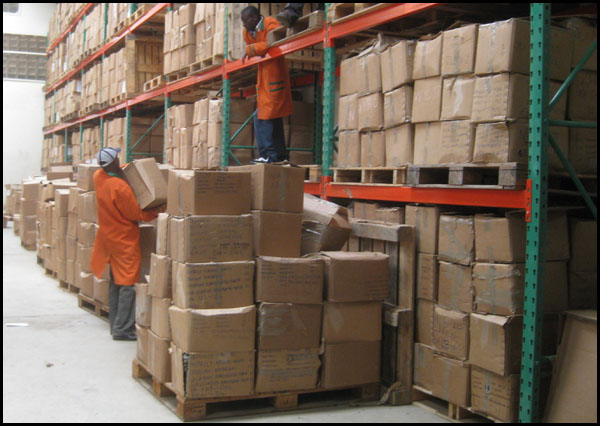
The world of small-scale surveys may not change dramatically, but the impact of technology on censuses is huge. This is a photo from an East African country that recently conducted a census. The warehouse in this photo stores all of the census forms and requires many workers to operate:

warehouse

What if an EA were not in the final set ... how easy would it be to find in a mountain of forms? Imagine a world in which all data collection is conducted on a phone or a tablet and immediately sent to the operation headquarters. Data editing would be minimized and the time from collection to publication could effectively be cut to almost zero. Such a world will be an exciting one.

Happy Holidays


To all CSPro users around the world, the CSPro development team wishes you a happy holiday season. I have been fortunate this year to have had the chance to work on CSPro data processing with users in Armenia, Bangladesh, Cambodia, Kenya, and Paraguay. Add in the hundreds of users who have emailed with questions, and CSPro users add up to a nice community. I hope that this website, and increased content next year, will help you fulfill your needs.

2012 should be a good year for CSPro, first with the addition of Unicode support, and then with steps towards the future of data entry, with focus on Android and other handheld development.

Simplifying Batch Exports


When CSPro has an interface for a tool, I suggest that you use the interface as much as possible, but on occasion a user might want to write code for more advanced functionality. One such example is when writing code for advanced export operations.

The CSPro help documents include some information on the export statement, but I often forget the syntax or what exactly the parameters should be. Fortunately, now with CSPro 4.1.002, a feature of the Export Data tool allows you to view the code that powers the export. By selecting Options -> Copy Logic to Clipboard, you can then take the export logic and insert it in the batch application of your choosing. This is a nice way to quickly get the basic export code needed and then you can build off of that.

For an example of a batch export that uses a lookup file, imagine that I have a data file describing stores and their customers. One of the attributes of a customer record is a country code that describes where the customer lives. When exporting the names of the customers, I do not want the two-letter country code, but the full name of the country. Using this list of country codes as a lookup file, I would go into the export tool, select the fields that I want to export, and then after copying the logic to the clipboard I would see code like this:

PROC GLOBAL
SET EXPLICIT;

NUMERIC rec_occ;

FILE cspro_export_file_var_f;

PROC COUNTRYCODEEXPORT_QUEST
PreProc
   
set behavior() export ( CommaDelim , ItemOnly );

   
For rec_occ in RECORD CUSTOMER_REC do
       
EXPORT TO cspro_export_file_var_f
       
CASE_ID(STORE_ID)
        STORE_REC, CUSTOMER_REC;
   
Enddo;

I would insert this code into a new batch application, add my lookup file code, and I would end up with something like this:

PROC GLOBAL

NUMERIC rec_occ;

FILE cspro_export_file_var_f;


PROC COUNTRYCODEEXPORT_FF


PROC COUNTRYCODEEXPORT_QUEST

PreProc

   
set behavior() export ( CommaDelim , ItemOnly );

   
For rec_occ in RECORD CUSTOMER_REC do

       
// look up the country name
        if not loadcase(COUNTRYCODES_DICT,CUSTOMER_COUNTRY) then
           
errmsg("Could not find country code: %s",CUSTOMER_COUNTRY);
            FULL_NAME = 
"<invalid>";
       
endif;

       
EXPORT TO cspro_export_file_var_f
       
CASE_ID(STORE_ID)
        STORE_REC, CUSTOMER_REC FULL_NAME; 
// FULL_NAME is added here (it comes from the lookup file)
    Enddo;

This feature in the Export Data tool vastly simplified my task, allowing me to focus on the lookup file programming, rather than the syntax of the export statement. My exported file now contains data from two files:

500  Pastry Pantry     Barack Obama          US  United States
500  Pastry Pantry     Angela Merkel         DE  Germany
500  Pastry Pantry     Hu Jintao             CN  China
800  Chocolate Heaven  Jacob Zuma            ZA  South Africa
800  Chocolate Heaven  Alexander Lukashenko  BY  Belarus

This is the input file:

10500Pastry Pantry
20500Barack Obama                                      US
20500Angela Merkel                                     DE
20500Hu Jintao                                         CN
10800Chocolate Heaven
20800Jacob Zuma                                        ZA
20800Alexander Lukashenko                              BY

Download this example.