Including Data Files in Packed Applications


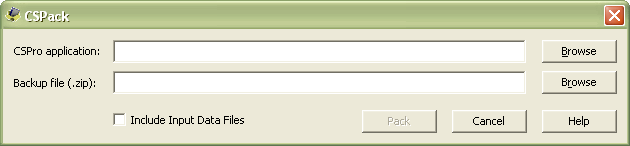
The Pack Application tool has a new feature: "Include Input Data Files":

cspack

Selecting this option will read the PFF for your application, if one exists, and include in the zip file the input data files that are referenced in the PFF. If you are running a large data entry operation with many data files, this may be of limited use, but if you are entering data for a small survey, you may only have one data file, and this option allows you to easily encapsulate all the important files for your application.

Aliasing Program Symbols


A longstanding debate among CSPro programmers concerns the naming convention to use when adding items to a dictionary. For example, you might have five questions: name, relationship, sex, age, and marital status. One approach is to match the item name to the question topic, like:

  • NAME
  • RELATIONSHIP
  • SEX
  • AGE
  • MARITAL_STATUS

This can lead to very long names though. For example, you might ask: children ever born [males alive], children ever born [females alive], children ever born [males dead], children ever born [females dead], and so on. Having a name like CHILDREN_EVER_BORN_MALE_ALIVE is very descriptive, but typing it in logic is very cumbersome.

Another approach is to use the question number for the name, so the above might be something like:

  • P01
  • P02
  • P03
  • P04
  • P05

These short names are very easy to type in logic so they are useful in batch programming, but they are cryptic to people who are looking at your code for the first time.

A third approach is a hybrid, combining the question number and the variable name:

  • P01_NAME
  • P02_RELATIONSHIP
  • P03_SEX
  • P04_AGE
  • P05_MARITAL_STATUS

The advantage of this approach is that, unlike the first approach, it is easy to identify what section in the questionnaire each item comes from (P = population), but the downside is the names are the longest of all approaches.

I personally program using the second approach. I find that when you are working on a survey or census for weeks or months on end, after just a short time you will know the questionnaire contents in and out, and you will know what P03 is versus P23 versus H15. When I am writing batch edits, I like that I can write short names for the variables. However, if distributing a dictionary with the data set, I might create a duplicate CSPro dictionary with longer and more descriptive item names.

CSPro 5 has a feature, aliases, that simplifies this dilemma. If you want to use both long and short names, you can alias a shorter name to a longer name. An alias is another way to refer to the item in logic. This means that you can create your dictionary using long descriptive names and then use short names in logic. For example:

alias   P01 : P01_NAME,
        P02 : P02_RELATIONSHIP,
        P03 : P03_SEX,
        P04 : P04_AGE,
        P05 : P05_MARITAL_STATUS;

This code would be placed at the top of your logic in the PROC GLOBAL section. After the alias statement, P04 and P04_AGE are interchangeable in the code. Any "symbol" in logic can be aliased, including item and record names, form and group names, and working storage variables. Only one alias can exist for each symbol though.

Has Operator


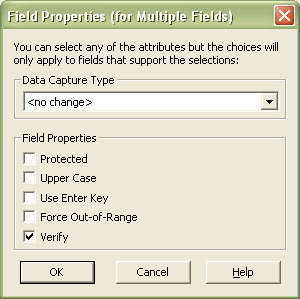
Has is a new operator available in CSPro 5. Has works like in but on multiply-occurring items instead of a single item occurrence. For example, if relationship is a field on a repeating person record, you might write:

if RELATIONSHIP has 4,5 then // do any of the relationship values have either 4 or 5?

The above code is identical to what could have been written as the following in CSPro 4.1:

if seek(RELATIONSHIP where RELATIONSHIP in 4,5) > 0 then

The has operator makes working with multiply-occurring items a lot easier and intuitive. For example, you might have an item in your dictionary called OPINION that repeats ten times. The data for these ten opinion questions (do you like hamburgers? do you like the color blue? etc.) is keyed into the OPINION field. If the user never enters Yes (1) for any of the fields, then you will skip past a set of questions. You can now write this easily with the has operator:

if not OPINION has 1 then
   
skip to NEXT_FORM;
endif;

Skipping to the Beginning of a Roster


With a roster on a form, it is quite common that you want to skip to the first field of the next occurrence. For example, a population roster might include a set of questions only asked of women aged 15-49. In the past, you might write something like:

PROC CHILDREN_EVER_BORN

preproc

   
if not ( SEX = 2 and AGE in 15:49 ) then
       
skip to next RELATIONSHIP;
   
endif;

This approach worked fine but could be annoying in cases when you added new fields to the beginning of the roster. For example, if before asking the relationship you now want to ask the name, then you would have to view the logic, find all the appropriate references to relationship, and change them to name. In CSPro 5 you can write:

PROC CHILDREN_EVER_BORN

preproc

   
if not ( SEX = 2 and AGE in 15:49 ) then
       
skip to next;
   
endif;

Writing skip to next without a field name will always go to the first field of the next occurrence in a repeating group.

CSPro 5.0.1 to be Released Soon


CSPro 5.0.1 will be officially released soon, hopefully before the end of July.

The big feature that makes this a major release is the inclusion of Unicode support. This means that now dictionaries, forms, tables, etc. can support Arabic, Chinese, and all the various languages with scripts that do not use Latin characters. Data files can also include Unicode characters so they are now saved in UTF-8 format. When CSPro is released, there will be a Unicode Primer in the helps that will include more information about the implications of the change.

Another change is that PDA (PocketPC) support has been dropped, so anyone using CSPro for Windows Mobile devices must still use version 4.1.

Over the next few days I will blog about some new features that exist in this upgrade.