Export Data
In addition to exporting data via Tools -> Export Data, Data Manager has another way to export data to other file formats. It can be found by selecting the File menu and clicking Export Data.
This export feature allows data to be written natively to the formats supported by the Export Data tool, with a couple exceptions:
When selecting Export Data from the File menu, all cases in the data source are exported. You can use the case listing's context menu, selecting Export Case or Export Selected Cases, to export a subset of cases.
The table below shows how the output file formats from the Export Data tool compare to Data Manager's Export Data feature, when the "Output one file..." checkbox is unchecked:
| Output File Type | Export Data Tool Filenames | Data Manager Export Filenames | Notes |
|---|---|---|---|
| CSV | filename.csv | filename.csv | Written natively, one file per dictionary record. Handles quote marks properly. |
| Excel | (n/a) | filename.xlsx | Written natively to a single workbook, one worksheet per dictionary record. |
| JSON | (n/a) | filename.json | Written natively to a single file as an array of case objects. |
| R | filename.dat filename.R | filename.RData | Written natively to a single file, one vector per dictionary record. |
| SAS | filename.dat filename.sas | filename.xpt filename.xpt.sas | Written natively to the two files shown. |
| SPSS | filename.dat filename.sps | filename.sav | Written natively, one file per dictionary record. |
| Stata | filename.dat filename.dct filename.do | filename.dta | Written natively, one file per dictionary record. |
Example 1
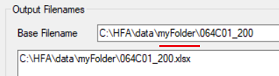
Let's look at Excel first. Once the Export Data dialog is launched, choose Excel. By default, a single Excel workbook will be created with the same filename as the data but using the .xlsx extension, as shown below. The resultant Excel file will contain one worksheet for each dictionary record found in the data file.
The only deviation from the default settings was the addition of myFolder. The data file being exported is located in the C:\HFA\data folder, and is named 064C01_200.csdb. The resultant 064C01_200.xlsx file will be placed within the subfolder "myFolder." If this folder does not exist, CSPro will create it.
Example 2
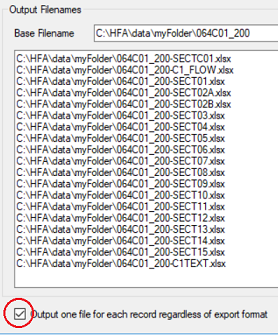
Let's revisit the Excel example. Note the "Output" checkbox selection made below. This tells the export feature to write each dictionary record found to a separate Excel workbook (rather than creating a single workbook where each record gets placed on a separate worksheet). The "Output" checkbox only impacts the file types Excel, JSON, R, and SAS.
Summary of Export File Types
The table below summarizes the specific files that will be generated for the possible export types. By default, the output filename will use the data filename as the base name (although this can be changed). Most exported file types will also append the dictionary record name to the base filename, as most of the export files represent dictionary records (this part of the name cannot be changed).
| Export Format | Export Filename | Output Box Checked? | Dictionary Record-to-Export File Relationship | Notes on "Output" Checkbox |
|---|---|---|---|---|
| CSV | record_name.csv | No | 1 .csv file for each record | |
| CSV | record_name.csv | Yes | 1 .csv file for each record | No effect, same files output as when 'No' chosen |
| Excel | filename.xlsx | No | 1 .xlsx file for the entire data file | Each record is a separate worksheet |
| Excel | record_name.xlsx | Yes | 1 .xlsx file for each record | |
| JSON | filename.json | No | 1 .json file for the entire data file | Each record is a separate array of objects |
| JSON | record_name.json | Yes | 1 .json file for each record | |
| R | filename.RData | No | 1 .RData file for the entire data file | Each record is a separate vector |
| R | record_name.RData | Yes | 1 .RData file for each record | |
| SAS | filename.xpt filename.xpt.sas | No | 1 .xpt/.sas file pair for the entire data file | |
| SAS | record_name.xpt record_name.xpt.sas | Yes | 1 .xpt/.sas file pair for each record | |
| SPSS | record_name.sav | No | 1 .sav file for each record | |
| SPSS | record_name.sav | Yes | 1 .sav file for each record | No effect, same files output as when 'No' chosen |
| Stata | record_name.dta | No | 1 .dta file for each record | |
| Stata | record_name.dta | Yes | 1 .dta file for each record | No effect, same files output as when 'No' chosen |